Free AI Interior Design: Can You Redesign a Room Without Paying?
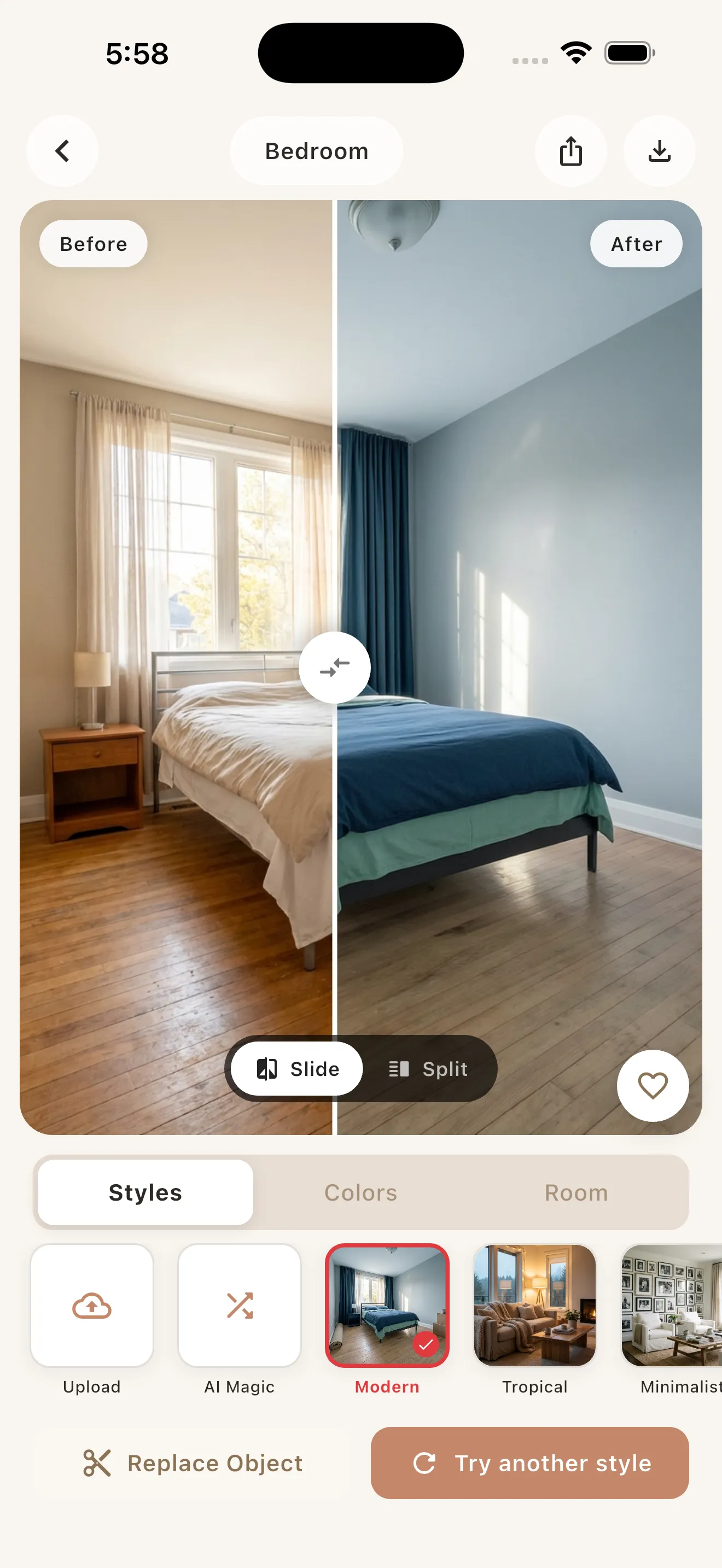
Yes, you can redesign a room with AI without paying. Most modern AI interior design apps, including Archify, are free to download and let you generate your first photorealistic redesigns at no cost. You snap a photo, pick a style, and get a before/after in seconds — and only pay if you want unlimited redesigns later.
The catch is that “free” almost always means freemium: a limited number of free designs to prove the app works on your actual room, followed by an in-app subscription for heavy use. Below, we break down exactly what you get for free today, what tends to cost money, and how to squeeze the most value out of a free redesign before you ever consider paying.
How free AI interior design actually works
Nearly every reputable AI room designer in 2026 runs on a freemium model. The download is free, the app is free to open, and you get a handful of free AI redesigns to try before any paywall appears. This lets you confirm the AI handles your lighting, your furniture, and your room shape — not just a polished demo.
After your free credits, apps switch to a subscription for unlimited generations. The category default is a weekly or annual auto-renewing subscription, which is how apps like Home AI, House AI, Interior AI Room, and AI Room Design are typically structured.
Why apps give designs away for free
AI image generation costs real money to run on every single render. Free credits are essentially a sample: enough to get a genuine result and decide whether the tool earns a place on your phone. The smart move as a user is to treat those free designs as a test drive, not a finished project.
What’s typically free vs paid
Here’s how the free and paid tiers usually break down across leading AI interior design apps:
| Feature | Usually free | Usually paid |
|---|---|---|
| Download & account | Yes | — |
| First few AI redesigns | Yes | — |
| Core design styles | Often yes (sample) | Full library unlocked |
| High-resolution / watermark-free export | Sometimes | Usually |
| Unlimited redesigns | No | Yes (subscription) |
| Priority / faster generation | Rarely | Sometimes |
| Both interiors and exteriors | Varies | Often full access |
With Archify, the download is free and your first redesigns are free, so you can test the app on a real room before deciding. Unlimited AI redesigns are available through an in-app subscription if you decide to keep going.
What you can realistically do for free
A free tier is more capable than most people expect. With your free redesigns, you can typically:
- Redesign any room from one photo — bedroom, living room, kitchen, or bathroom — and get a photorealistic before/after.
- Test multiple styles on the same space, from Modern and Scandinavian to Japandi, Industrial, Bohemian, or Mid-Century. Archify offers 21 styles and 12 color palettes, so even a few free runs cover a lot of ground.
- Preview exteriors too — house facades, front yards, gardens, patios, and backyards — not just interiors.
- Keep your room’s real layout. A key quality marker: Archify restyles your actual room, preserving the real walls, windows, and perspective rather than generating a random new room. That makes free previews genuinely useful for planning.
If you want a deeper walkthrough of the full process, our step-by-step guide to remodeling a room with AI covers it in detail.
Realistic expectations: what free AI design won’t do
Being honest about limits saves frustration:
- Free credits run out. You’ll get a meaningful sample, not infinite generations. Plan your free runs.
- AI designs are for visualization and inspiration — not construction. A redesign shows you the look and feel of a style in your space. It is not a construction-ready architectural plan, and measurements should never be taken from a render.
- Results depend on your photo. Dark, cluttered, or extremely tight-angle shots produce weaker results than clean, well-lit ones.
- Free tiers may cap resolution or export options. A free preview is perfect for deciding direction; you may want a subscription for high-res, watermark-free images.
Tips to get the most out of free redesigns
You can stretch a small number of free designs a long way with a little strategy.
1. Shoot the best possible photo first
Open the blinds, turn on the lights, and stand in a corner so the camera captures two or three walls. Better input means a far better free result — and you won’t waste a free credit on a fuzzy render.
2. Decide your goal before you tap “generate”
Are you choosing between two styles? Testing a palette? Planning a rental refresh? Knowing your question means each free design answers something specific instead of being a random experiment.
3. Compare styles deliberately, not randomly
Use one free run per contrasting style — for example Scandinavian vs. Industrial — rather than three near-identical looks. You’ll learn more about your space’s potential per credit.
4. Renters: lean into removable changes
If you can’t renovate, focus your free designs on furniture, color, textiles, and decor you can actually swap. Our guide to AI room makeovers for renters shows how to redesign without touching the walls.
5. Save your favorites before credits expire
Screenshot or export the redesigns you love while you still have access, so you have a reference even if you don’t subscribe right away.
How to choose a free app worth your time
Not all “free” apps are equal. When testing, look for:
- A genuinely free first run (no card required just to see one result).
- Layout preservation — the app should restyle your room, not invent a new one.
- Both interiors and exteriors if you care about curb appeal as well as rooms.
- A clear, fair subscription if you decide to upgrade — ideally with annual options, not just a weekly charge.
For a hands-on, tested breakdown of the leading options, see our roundup of the best AI interior design apps in 2026, or the head-to-head in Archify vs Home AI vs Interior AI.
The bottom line
You absolutely can redesign a room with AI without paying — the free tier of a good freemium app is enough to test real styles on your real space and decide what you love. Just go in knowing that free means limited but useful, that the results are for inspiration rather than blueprints, and that a small amount of planning makes each free design count.
If you want to see your own room reimagined in seconds, Archify is free to download and free to try on the iPhone App Store (Android is coming soon) — a low-pressure way to find out what your space could become before you spend a cent.
Frequently asked questions
Is Archify free to use?
Archify is free to download and free to try. Your first AI redesigns are included at no cost, so you can test the app on a real room before deciding anything. If you want unlimited redesigns, Archify offers an in-app subscription, but you can get genuine photorealistic before/after results without paying first.
Can I really redesign a room for free with AI?
Yes. Most AI interior design apps, including Archify, run on a freemium model: free download plus a handful of free redesigns. That is enough to snap a photo, try real styles on your actual room, and see photorealistic results. You only pay later if you want unlimited generations through a subscription.
What's the difference between free and paid AI room design?
Free tiers in apps like Archify usually cover the download and your first redesigns, letting you sample styles and confirm the AI works on your space. Paid subscriptions unlock unlimited redesigns and often higher-resolution or watermark-free exports. The free run is a real test drive, while paying suits ongoing or large projects.
How many free redesigns do I get with Archify?
Archify gives you free redesigns to start, so you can try the app on a real room before subscribing. The exact number can change, so the best approach is to download Archify, plan your shots, and use each free design deliberately — testing contrasting styles to learn the most about your space.
Are free AI interior designs accurate enough to build from?
No. Free or paid, Archify's redesigns are for visualization and inspiration only — they show how a style would look in your space while preserving its real layout. They are not construction-ready architectural plans, so never take measurements from a render or hand one to a contractor as a blueprint.
Does free AI interior design work for exteriors too?
Yes. Archify works on both interiors — bedrooms, living rooms, kitchens, bathrooms — and exteriors like house facades, front yards, gardens, patios, and backyards. With free redesigns, you can preview curb appeal as well as indoor spaces, all from a single photo while keeping your property's real structure intact.