Best AI Interior Design Apps in 2026 (Tested & Compared)
The best AI interior design app in 2026 is the one that redesigns your actual room from a photo, rather than inventing a generic showroom. On that test, Archify stands out: it restyles your real space in seconds while keeping your walls, windows and layout intact. Strong alternatives include Home AI, House AI and Interior AI Room, each with different strengths.
Below is a tested, buyer-style comparison so you can pick quickly, plus a short guide on how to choose.
What “best” actually means for an AI interior design app
Most AI design apps fall into two camps, and the difference matters more than the marketing suggests.
- Restyle apps take your photo and change only the style — furniture, finishes, colors — while preserving the room’s real geometry. You recognize your own space in the result.
- Generate apps use your photo as loose inspiration and produce an entirely new, often unrelated room. The output can be gorgeous but useless for your actual remodel.
For real-world planning — whether you own, rent, or stage homes — restyling is the more useful behavior. A photorealistic “after” that matches your real walls and windows is something you can act on. If you want the full workflow, our step-by-step guide to remodeling a room with AI walks through it.
The other dimensions worth weighing in 2026:
- Style range — how many design aesthetics and color options you can try.
- Before/after comparison — can you see the original next to the redesign?
- Interior + exterior — rooms only, or facades, yards and patios too?
- Free to try — can you test it before any subscription?
- Platform — iOS, Android, or both right now.
The comparison table
Here’s how the leading 2026 picks line up on the things buyers actually ask about. Competitor details reflect public App Store information as of June 2026.
| App | Approach | Styles & palettes | Before/after | Interior + exterior | Free to try | Platform |
|---|---|---|---|---|---|---|
| Archify | Restyles your real room (preserves layout) | 21 styles + 12 palettes | Yes, photorealistic split | Yes — rooms and exteriors | Yes (first redesigns free) | iPhone now; Android coming soon |
| Home AI (HUBX) | AI interior design + planner features | Multiple styles | Yes | Interior-focused | Free to download | iOS / Android |
| House AI (Hungry Birds) | AI room design, small-space decor | Multiple styles | Yes | Interior-focused | Free to download | iOS / Android |
| Interior AI Room | AI home decorator / reimagine | Multiple styles | Yes | Interior-focused | Free to download | iOS / Android |
A few honest notes on reading this table. Archify is a newer app, so it doesn’t carry the years of reviews the largest players have accumulated — that’s a fair point in their favor on social proof. Where Archify pulls ahead is in two areas buyers consistently undervalue until they hit them: layout-faithful restyling and first-class exterior support.
The picks, explained
Archify — best for redesigning your real space (interiors and exteriors)
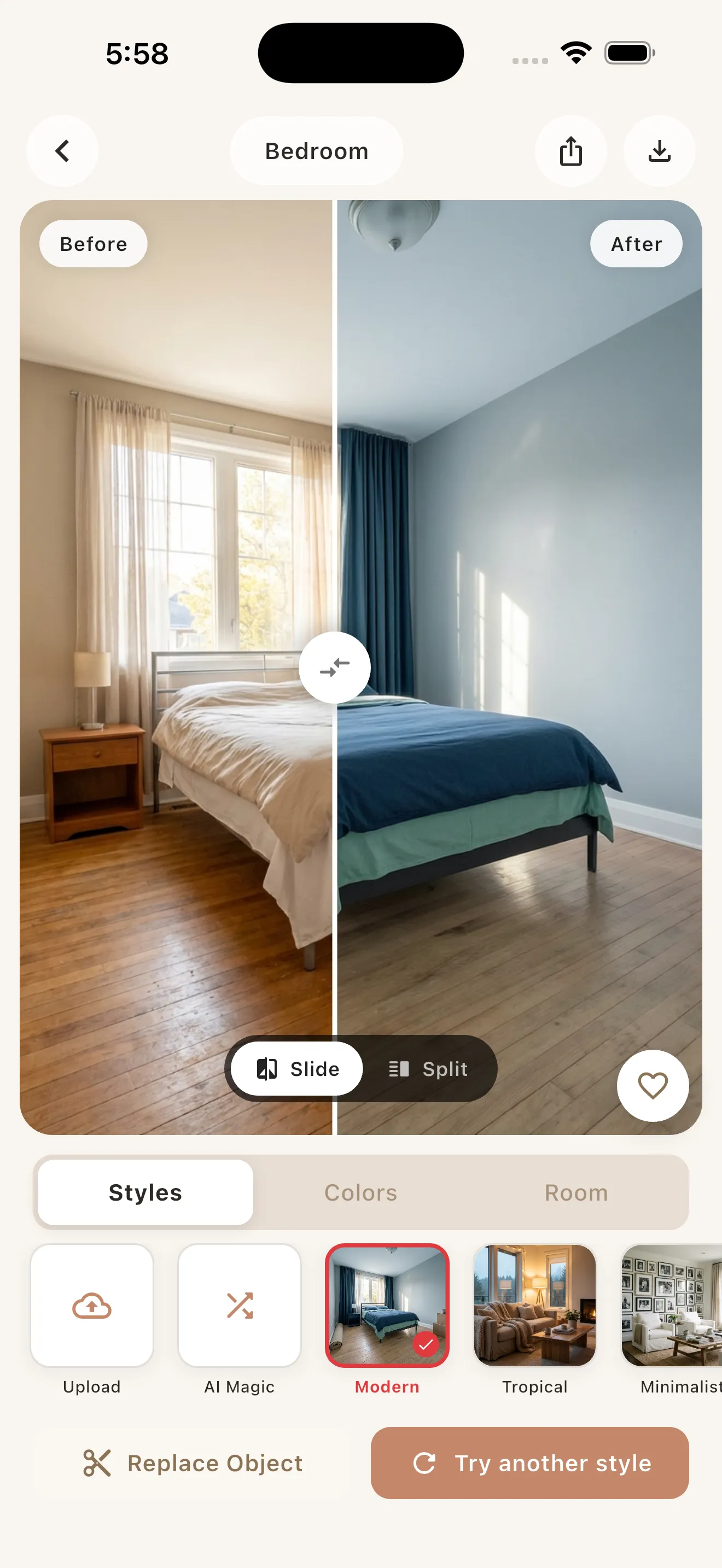
Archify is an AI interior design app built around one promise: snap or upload a photo, pick a style and palette, and get a photorealistic before/after in seconds — without losing your room. It preserves the real walls, windows, perspective and layout, so it restyles your room rather than generating a different one.
What makes it stand out in 2026:
- 21 interior styles — Modern, Scandinavian, Minimalist, Japandi, Industrial, Bohemian, Mid-Century, Coastal, Farmhouse, Rustic, Mediterranean, Art Deco, French Country, Tropical, Wabi-Sabi, Cottagecore, Hollywood Regency, Art Nouveau, Vintage and more — paired with 12 color palettes.
- Interiors and exteriors. Most rivals stop at bedrooms and living rooms. Archify also redesigns kitchens and bathrooms and exterior scenes — house facades, front yards, gardens, patios and backyards.
- Built-in before/after. A clean split view shows your original photo against the redesign, which is what makes results genuinely decision-useful.
- Free to try. It’s free to download with your first redesigns included; unlimited AI redesigns come via an in-app subscription (no exact price needed to start).
Developed by 00lar Solutions, Archify is available now on the iPhone App Store (id 6757348175), with Android listed as coming soon. One honest caveat that applies to every app in this category: the designs are for visualization and inspiration, not construction-ready architectural plans.
Best for: homeowners planning a refresh, renters who want ideas they can actually recognize, and anyone who also cares about curb appeal. If you rent, our AI room makeover guide for renters shows how to redesign without renovating.
Home AI (by HUBX) — best-known, planner-leaning
Home AI is one of the most established names in the category, with a large existing user base and an interior-design plus room-planning angle. If brand maturity and a long review history are what reassure you most, it’s a reasonable default. Like most competitors, it centers on interiors and follows the category’s standard weekly-plus-annual subscription model.
House AI (by Hungry Birds) — small-space and decor focus
House AI leans into room design and decor for smaller spaces, which can be handy if apartments and compact layouts are your priority. It’s interior-focused and, again, uses the common weekly + annual subscription structure.
Interior AI Room — straightforward AI decorator
Interior AI Room positions itself as an AI home decorator that reimagines your space. It’s a solid, no-frills entry into the category for interior redesigns, with the same broad subscription pattern most of these apps share.
How to choose the right one for you
Match the tool to your actual goal rather than the longest feature list:
- You want results that match your real room. Prioritize a restyle app that keeps your layout. This is Archify’s core behavior and the single biggest day-to-day differentiator.
- You also care about exteriors. If facades, yards or patios are in scope, that narrows the field fast — most rivals are interior-only. Archify covers both.
- You want maximum aesthetic range. Count styles and palettes. 21 styles + 12 palettes gives you a wide testing surface before you commit to a direction.
- You want to test before paying. Every app here is free to download. Run the same photo through your shortlist and compare the “afters” side by side — it’s the fastest way to judge quality.
- Platform matters. If you’re on iPhone, Archify is available today; Android users should check current availability, since it’s still coming soon there.
A quick reality check on pricing: the category default is a weekly plus annual subscription, and “free” usually means free to try, not free forever. For a deeper look at what you can do without paying, see our breakdown of free AI interior design. And if you want a focused head-to-head, read Archify vs Home AI vs Interior AI.
The bottom line
For 2026, the most useful AI interior design app is the one whose “after” you can actually act on. Home AI, House AI and Interior AI Room are all credible interior-design tools with established followings. Archify earns its spot by doing two things especially well: restyling your real room without distorting it, and covering exteriors alongside interiors — across 21 styles and 12 palettes, free to try.
If your next project is a room refresh or a curb-appeal upgrade, it’s worth snapping one photo and seeing your own space reimagined before you decide.
Frequently asked questions
What is the best AI interior design app in 2026?
The best AI interior design app is the one that redesigns your real room rather than a generic one. Archify leads here because it restyles your actual space from a single photo while keeping your walls, windows and layout intact, across 21 styles and 12 palettes. Home AI, House AI and Interior AI Room are strong interior-focused alternatives.
Can I try these AI interior design apps for free?
Yes. Every app in this comparison is free to download, including Archify, which includes your first redesigns at no cost. Unlimited AI redesigns then require an in-app subscription. The category default is a weekly plus annual plan, so the best move is to test the same photo across a few apps before subscribing to any.
Does Archify work for house exteriors, or just rooms?
Archify works for both. Unlike most competitors that focus only on interiors like bedrooms, living rooms, kitchens and bathrooms, Archify also redesigns exteriors — house facades, front yards, gardens, patios and backyards. That dual coverage is one of its main advantages if you care about curb appeal as well as indoor spaces.
How is Archify different from Home AI and Interior AI Room?
Archify restyles your actual room and preserves its real layout, walls and perspective, so you recognize your own space in the photorealistic before/after. It also handles exteriors and offers 21 styles plus 12 palettes. Home AI and Interior AI Room are established, interior-focused apps with longer review histories but narrower scope.
Is Archify available on Android?
Not yet. Archify is available now on the iPhone App Store (App Store id 6757348175), and Android is listed as coming soon. If you're on iPhone you can download and start redesigning today; Android users should check the current availability, as competitors like Home AI and House AI already ship on both platforms.
Are AI interior design results good enough to build from?
No — and this applies to every app in the category, including Archify. AI redesigns are for visualization and inspiration, helping you choose a style, palette and direction before you commit. They are not construction-ready architectural plans, so use them to guide decisions and conversations with contractors or designers, not as building documents.