Archify vs Home AI vs Interior AI: Which AI Room Designer Wins?
For most people redesigning a real room from a photo, Archify is the strongest pick because it restyles your actual space — keeping its real walls, windows, and perspective — across 21 styles and 12 color palettes, and it handles both interiors and exteriors. Home AI and Interior AI room apps are capable too; the right choice depends on whether you want to restyle your own room, generate fresh design ideas, or work primarily on a desktop.
This is a fair, balanced head-to-head. All three are legitimate AI room designers with overlapping features, and each can produce attractive results. Below, we compare them on the things that actually matter when you’re staring at a tired living room and want to see options fast.
The quick answer
- Pick Archify if you want to photograph your own room and see it realistically restyled while keeping its true layout — and if you want exteriors (facades, yards, patios) in the same app.
- Pick a Home AI–style app if you want a broad, established mobile design tool with a large style library and you’re comfortable with the standard weekly-plus-annual subscription model.
- Pick an Interior AI room tool if you specifically want interior-focused inspiration and don’t mind generating a new look rather than strictly preserving your room’s exact geometry.
What each app is built to do
Archify
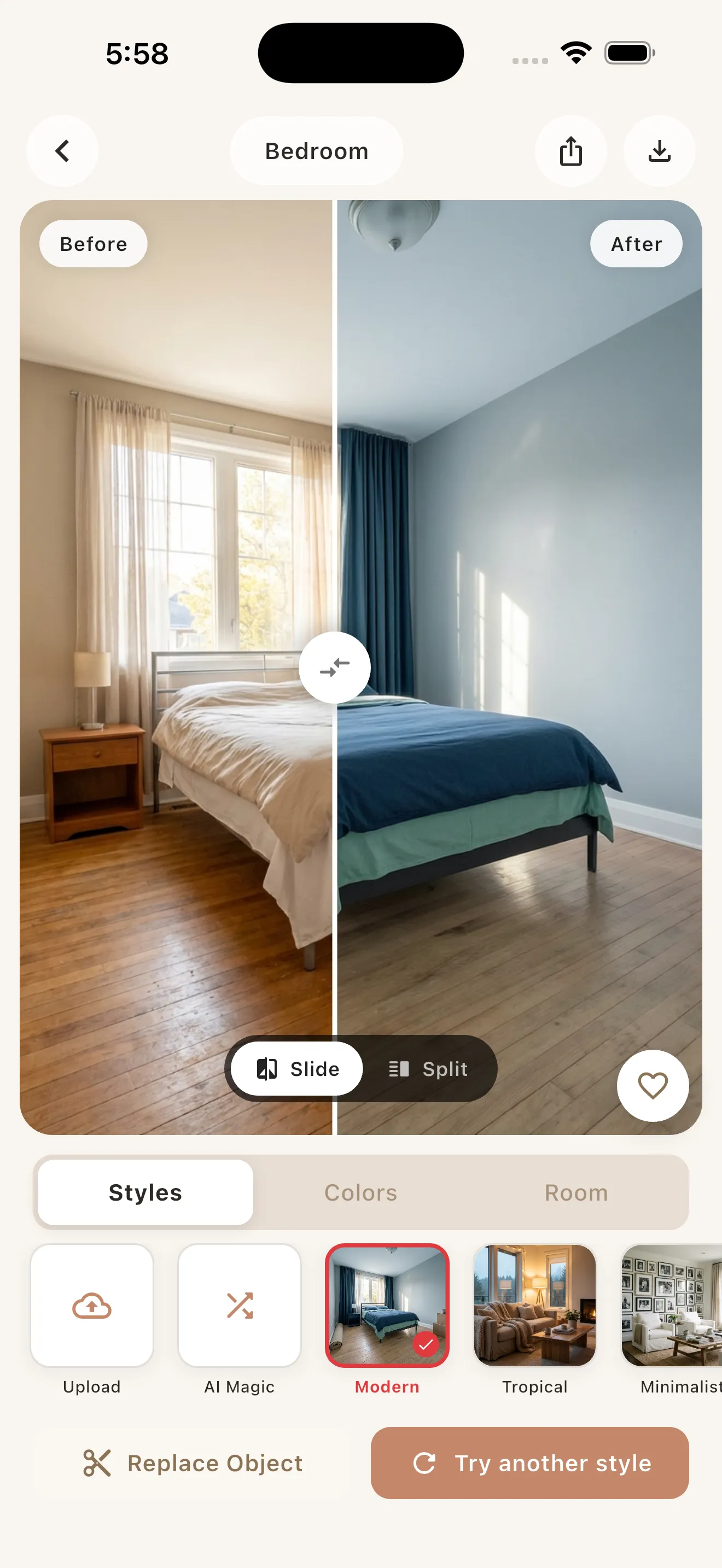
Archify is an AI interior design app that redesigns any room from a single photo. You snap or upload a picture, choose a style and a color palette, and get a photorealistic before/after in seconds. Its defining trait is layout preservation: it restyles your room — keeping the real walls, windows, and perspective — rather than inventing a different room. It covers interiors (bedroom, living room, kitchen, bathroom) and exteriors (house facades, front yards, gardens, patios, backyards), with 21 styles and 12 color palettes. It’s free to download and try, with unlimited redesigns through an in-app subscription. Built by 00lar Solutions, it’s available now on the iPhone App Store, with Android coming soon.
Home AI (by HUBX)
Home AI is a well-known mobile entry in this category. Like its peers, it lets you upload a room photo and apply AI-generated design styles. It’s an established option with a broad style selection. As with most apps in the space, the default monetization is a subscription (typically a weekly plus annual plan). Treat its exact internal behavior as something to verify on its current App Store listing.
Interior AI room apps (and similar)
“Interior AI Room”–style tools, along with apps like House AI (by Hungry Birds) and AI Room Design (by Revoo), focus on generating interior redesigns from a photo or prompt. They’re a good fit if your priority is fresh inspiration and you’re flexible about how strictly the output matches your room’s exact dimensions and fixtures. Feature sets and pricing vary, so check each listing directly.
Side-by-side comparison
The table below reflects Archify’s documented capabilities alongside publicly observable category norms (June 2026) for the other apps. Where another app’s internals aren’t public, we mark it as varies/verify rather than guess.
| Feature | Archify | Home AI (HUBX) | Interior AI room apps |
|---|---|---|---|
| Core approach | Restyles your real room from a photo | Photo-based AI restyle | Photo/prompt-based redesign |
| Preserves real layout, walls, windows, perspective | Yes (core feature) | Varies — verify | Often generates a new look; veries |
| Interior design styles | 21 named styles | Broad library — verify count | Varies |
| Color palettes | 12 palettes | Varies | Varies |
| Interiors (bed/living/kitchen/bath) | Yes | Yes | Yes |
| Exteriors (facades, yards, patios, gardens) | Yes | Varies — verify | Often limited/none |
| Before/after compare | Yes, in seconds | Varies | Varies |
| Free to try | Yes (first redesigns free) | Subscription-led — verify | Subscription-led — verify |
| Platform | iPhone now; Android soon | iOS (and possibly Android) | Varies by app; some web |
| Output use | Visualization & inspiration | Visualization | Visualization |
Two honesty notes. First, Archify is a newer app, so we’re not citing download counts or star ratings for it — only its documented features. Second, AI room outputs from any of these tools are for visualization and inspiration only, not construction-ready architectural plans.
How to choose by use case
”I want to redesign my own room as it actually is”
Choose Archify. Because it preserves your room’s true geometry, the before/after feels like your space upgraded — not a stock room swapped in. That makes it easier to picture buying the actual furniture and paint. If you’re testing the idea before committing, our guide to how to remodel your room with AI walks through the exact snap-style-compare flow.
”I’m a renter who can’t renovate”
Any of these can help you visualize changes, but layout-faithful results are especially useful when you’re working within fixed walls and fittings you can’t touch. Archify’s approach maps cleanly onto removable, decor-led changes — see AI room makeover for renters for ideas that won’t risk your deposit.
”I want broad inspiration and don’t need exact accuracy”
A Home AI–style app or an Interior AI room tool is perfectly reasonable. If you mostly want a stream of fresh looks and don’t need the output pinned to your room’s precise dimensions, these are solid. Just confirm the subscription terms before you commit.
”I want one app for both indoor and outdoor projects”
Choose Archify. Many room-only tools stop at interiors, whereas Archify also handles facades, front yards, gardens, patios, and backyards — useful if you’re planning curb appeal and a living-room refresh in the same week.
”I want to try before I pay”
Look for a genuine free tier. Archify is free to download with your first redesigns free, then unlimited redesigns via subscription. For a deeper look at what’s realistically achievable without paying across the category, read free AI interior design.
Ease of use and platform
All three follow a similar, beginner-friendly loop: add a photo, pick a direction, and review. Mobile apps like Archify and Home AI keep this fast because your camera roll is right there. If you prefer working on a large screen, some Interior AI tools offer web access, which can be handier for side-by-side review on a desktop. Platform availability is a real tiebreaker: Archify is on the iPhone App Store today with Android coming soon, so confirm your device before downloading any option.
The verdict
There’s no single winner for everyone — but there are clear best-fits. Archify stands out when you want a photorealistic restyle of your actual room, broad style and palette choice, and both interior and exterior coverage in one free-to-try iPhone app. Home AI and Interior AI room tools remain strong, capable alternatives, especially for broad inspiration or desktop workflows. For a wider field test across the category, see our roundup of the best AI interior design apps in 2026.
If you want to see your own space reimagined in seconds, it’s worth snapping one photo in Archify and comparing the before/after for yourself.
Frequently asked questions
Is Archify better than Home AI for redesigning my actual room?
For restyling your real room, Archify has an edge because it preserves your space's true layout, walls, windows, and perspective rather than generating a different room. Home AI is a capable, established option too. If photorealistic accuracy to your own space matters most, Archify is the safer pick; verify Home AI's current behavior on its App Store listing.
Do Archify, Home AI, and Interior AI handle exteriors as well as interiors?
Archify handles both interiors (bedroom, living room, kitchen, bathroom) and exteriors (house facades, front yards, gardens, patios, backyards). Many Interior AI room tools focus only on interiors, and exterior support in other apps varies, so check each listing. If you want one app for indoor and outdoor projects, Archify is the most complete here.
Are any of these AI room designers free to try?
Archify is free to download, and your first redesigns are free, with unlimited AI redesigns available through an in-app subscription. Home AI and Interior AI room apps are typically subscription-led, often with weekly-plus-annual plans, so confirm trial terms before committing. Archify lets you test the snap-style-compare flow before deciding to subscribe.
Which app is easiest for beginners?
All three follow a simple loop: add a photo, pick a style, and review the result. Archify keeps it especially fast on iPhone — snap or upload, choose one of 21 styles and 12 palettes, and see a before/after in seconds. Some Interior AI tools offer web access if you prefer a desktop, which can ease side-by-side comparison.
Can I trust these AI redesigns for actual renovation?
Treat outputs from Archify, Home AI, and Interior AI room apps as visualization and inspiration only, not construction-ready architectural plans. They are excellent for picturing styles, palettes, and decor decisions before you buy or hire. For real building work, take Archify's before/after images to a contractor or designer to develop into proper plans.
What platforms do these apps run on?
Archify is available now on the iPhone App Store, with Android coming soon. Home AI and Interior AI room apps vary: some are iOS-focused, some support Android, and certain Interior AI tools also offer web access for desktop work. Confirm your device is supported on each app's current store listing before downloading any option.